Tuesday, April 19, 2016

Arma 3, Stratis + EDEN Editor (Enhancements)

When BIS introduced EDEN 3D Editor (3DEN) for Arma 3 recently, I thought I'd jump at the opportunity to become creative in the 3D editor and add to the lacking map of Stratis for towns and bases.

The learning process of placing and manipulating objects was relatively easy due to the fact that I have used M3Editor in the past for creating within Arma 3 in a 3D environment (props to the author Maca134).

It didn't take me long to adjust to 3DEN, and get creating. Over the last month or so, in my spare time I have been designing and creating bases and towns on the map Stratis. I had the intentions of releasing it all for use within A3Wasteland (custom addition for a gaming community). I have recently approached AgentRev from A3Wasteland to offer what I have created to them to put any or all of what I have created into the 'stock' mission file (though I'm still yet to get a response at the time of this blog post).

As you can see from the screenshots of what I have created below... these are not just 'thrown together', as a lot of planning, thought and adjustments were made to make them appear as if they were 'stock/vanilla' map objects that BIS had designed.

Check out some of the screen shots below, or you can view the full album on imgur here.


If you have interest in using any or all of what I have created in your mission/mod for Arma 3 map Stratis, feel free to send me a private message on Twitter or Reddit.

In due time I have plans of releasing each created part (individually) or as a whole to either my blog as downloads or on the Steam Workshop... but no ETA for when that will be.

Creating these additions to the map Stratis is no easy feat, as they took quite a lot of time to create, and then fine-tune. Haven't checked out the 3DEN editor yet? Give it a go.

I will create more generic 'bases' in the future within the virtual environment, so I can then export to a script that can be run dynamically (relative positions) to place a base anywhere on a map, facing any direction (scripts already coded), so that any mission makers can easily run the command in their mission (init.sqf or manually) and the base(s) will appear before them.

Anyway... just thought I'd show what I have been upto within the Arma 3 EDEN editor since it's launch.

-soul.

Ace12, Twitch Channel Overlay Graphics

I was re-approached by Ace12 to see if I was interested in doing some overlay graphics for his stream (since he liked the banner graphics I had done already). I accepted (no cost to Ace12). The graphics wanted were a new follower-alert and such, as well as a "kills/wins/crashes" overlay, so he can keep track of his Arma 3 BR rounds, and display them for all his viewers to see.

I whipped up some graphics in Photoshop, running with the color scheme of his logo (and my banners). I came up with a simple ribbon/banner display with some overlay text in dark color, with the usual themed stroke and fades (example graphics have been resized, full graphics are 1920x1080).

^^ FOLLOWER ALERT ^^

^^ DONATION ALERT ^^

^^ HOSTED ALERT ^^

I also created an overlay graphic, which also fits in with the running theme from my Ace12 twitch banners, I put together a complete overlay (top and bottom) loosely based on what Zetsu already had designed for Ace12's overlay graphics, as well as adding in the bottom border with "the kills/wins/crashes" text.

^^ OVERLAY GRAPHICS ^^

Upon showing Ace12 what I had created (and all at no cost to him), he seemed very pleased with the final product of my creativeness. I do hope that he uses all of said graphics, as it will make his channel 'themed', which has more eye-appeal and gives flow to his channel, as all the graphics are matched rather than mismatched graphics from different sources.

I enjoy doing graphics (and have done for the last ~15 years on and off)... so expect more graphics posted on my blog in the future.

*EDIT. A V2 of said overlay. A bit cleaner overall.
^^ TOP BANNER ^^

^^ BOTTOM BANNER ^^
-soul.

Monday, April 04, 2016

Ace12, Twitch Channel Banner Graphics

Another quick post to show some graphics that I whipped up for an Arma 3 streamer who I have known for quite a while now... his nick name is Ace12, you can catch him on twitch here. Ace12 is from the USA and is an avid gamer of Arma 3, and mission/mod Battle Royale... as well as various other games. Check out his twitch channel to see his game play in action and my graphic banners in their glory.

Whilst watching Ace12's stream lately, I found that the banner graphics on his twitch stream were generic and mediocre, and didn't really fit the theme of his logo. At the time, I was feeling a lil' creative so I loaded up Photoshop, grabbed Ace12's logo (not sure who created the logo) and started creating something (better?).

Ace12 twitch channel logo

The banner dimensions were taken from the previous generic banners from his page, which then I created something to fit the theme of his channel, to have a proper theme throughout so nothing looked out of place, and kept things neat and small at the same time.

These are the banners I created below...


The banners took me all of 15 minutes to whip up (I'm getting better/quicker since restarting my graphics). I set up a custom template, then color picked the logo and threw some borders up with background masking for the pattern and fade, then chose a mono spaced font (fixed width) to type it all out with... made sure it was decently centered and saved them all out to png files.

At the time, Ace12 did not know about what I was doing in the background until I sent him a direct message with a link to see/grab all the new banners. He was appreciative of what I had done, liked them and proceeded to use them, so I was pleased.

Another set of free graphic done by yours truly, soul. ;P

P.S. Yup, I'm still around... just not coding much at the moment (but I will proceed to... sometime).

-soul.


Saturday, February 06, 2016

The Whirlpool Resistance, New Logo Creation

I have known some of 'The Whirlpool Resistance' (WpR) members for quite some time now, and have played Arma 3 A3Wasteland and Invade and Annex with them on and off over the last year or so.

WpR are an Australian/NewZealand based gaming group on PC and Console. In recent talks with a couple of members about WpR and it's vision, I saw that there was no real branding (or logo) to make the group stand out... as I found their web presence extremely bland.

Without letting any of the WpR members know, I started to create something that would be fitting within WpR and try to use their existing color scheme... that being, orange and blue (based on their banner text colors and current Arma 3 in-game group symbol/patch).

After a few revisions and subtle changes, the below graphic is what I came up with...
The NEW WpR branded logo
The NEW WpR branded logo (with shadowing)
After submitting this design to their forums for feedback, it was decided that they will accept and use the logo for their clan (after a couple of small changes). I was very pleased that the logo will be used. 

I did the new logo due to wanting to give something back to the WpR team, as I enjoy their company as well as enjoy being able to play on a very decent (and fun) Arma 3 Wasteland server in which they host.

Keep watch on WpR's web presence, as it will begin to change with nice branding and color scheme. There will also be an upcoming merchandise store with the above logo and variations of design work.

I also have done the new loading screen for their Arma 3 [WpR] A3Wasteland server, which is fitting with the new theme...

The NEW WpR Arma 3 Loading Screen Banner
*UPDATE... so I have been messing with some more graphics for WpR, that being a design or 3 for a 'stubby holder' (as shown below), using the same color theme and such.

Arma 3 Themed
Generic Themed
Generic Themed

Also, the TeamSpeak 3 logo/banner...
  ... and some variants of said logo/ts banner (just for test purposes).


P.S. back to my own coding 'soon'.

-soul.


Saturday, January 09, 2016

Arma 3, Custom Scripting - Server Restart Messages

ArmA 3 Scripting


Lately, whilst making a slight diversion from my own scripting, I have been helping out the guys from 'The Whirlpool Resistance' aka 'WpR' who are an Australian/New Zealand based gaming group. The new WpR ArmA web site (forums) can be viewed here. *August 2016, The group in which I support split/changed/updated and can now be found at Total Annihilation Gaming who are an Australian/New Zealand based gaming group (and they have a few USA based players also).


Without the usage of a Battleye client (eg BEC) running on the hosted server to help with timed server messages, I attempted to put together my own version of a script/timer function that was able to be ran on a hosted gaming server, or a dedicated gaming server... and I succeeded.

Beforehand there was no able way to warn/notify the players on the server about when the server was going to be restarted, you just had to keep notice of the time yourself, and many (if not all) players including myself have been caught out many times, wonder why the server d/c us... only to check the current local time to realize it was an actual server restart.


serverRestartMessage.sqf code preview

I have now scripted a server side function/loop to grab the actual hosted server time (not in-game time) and run a timing schedule off of it. Currently server reset times (Australia, Sydney time) are 03:00, 09:00,15:00 and 21:00. The timing routine keeps track (to the second) of the current server time in HH:MM:SS, it then warns you in-game from 30/20/10/5/2/1 minute(s) until restart, in the middle of the screen in big bold colorful writing. There is also an option to have it count down in seconds from the 1 minute mark (as seen in the second screenshot below).


30 minute warning message
the 60 second countdown has begun
I enjoy small scripting challenges like this one, especially when I succeed. I'm happy, the group is happy, the host is happy and the players are happy that they now have proper timed on-screen warning messages for the server restarts. :)

You can check out/download the script here on my GitHub.

P.S. Back to my own mod scripting soon.

-soul.


Friday, December 11, 2015

Arma 3, LMS Mission/Mod Progress... And Lots Of It!


Over the last few weeks I have been 'tinkering' away within the Arma 3 editor and running tests in a multi player environment on a dedicated Arma 3 server for my own "Last Man Standing" mission/mod. Needless to say, things are progressing rather quickly after another big learning curve.
 
What is this progress you may be asking?... Ok, I'll try to explain.


My "Care Package Run" script has been ported to a multi player environment (server side), with some code/routine optimization and enhancements.

+ Random calculations for care package drop locations are now more random, based on map grid size and current playable area (multi step custom routine).
Care Package Run - Debug Markers
+ Custom flare/smoke with any RGB color combination possible (no smoke grenades here!).
Care Package Delivery... Perty Custom Smoke
+ Changed the delivery method to a cargo helicopter. The helicopter opens the rear door whilst tilting backwards... then drops a care package out and flies off into the distance.
Cargo Helicopter... Deploy Care Package!


My "Bombing Run" script has been ported to a multi player environment (server side), with some code/routine optimization and enhancements.


+ Random calculations for bomb zone locations are now more random, based on map grid size and current playable area (multi step custom routine).
Bombing Run - Debug Markers
+ Amber markers on map "warn" you that the area will be bombed and to move away from the area (not just a red circle that pops up on map, then explosions.. smh).
Bombing Run - Amber Zone = Danger
+ Bomb zone size is random, as are the number of bombs being dropped per zone (which is relative to the bomb zone size).
Uh Ow... Bombing Plane
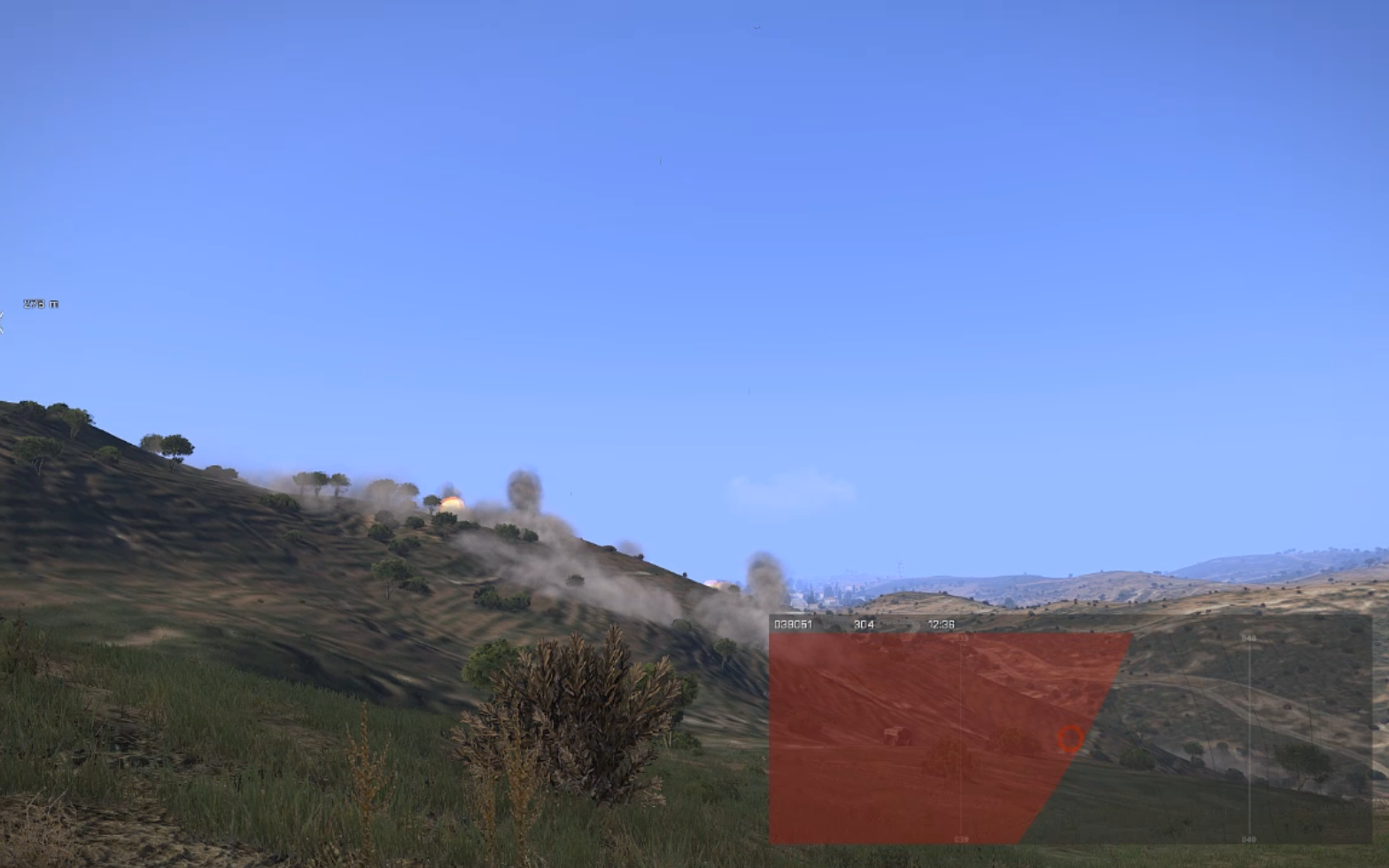
+ Red bombing zone markers will stay on map until the last bomb has been dropped and has exploded.
Red Zone = Bombs


My "Loot Spawn" script has been ported to a multi player environment (server side), and semi re-written for optimization.

+ More building positions for possible loot spawn (buildings that have limited amount or have no default positions now have some). See the yellow (manual positions) and red (dynamic positions) circle markers in the below screen shot.
So Many Loot Positions
Hey! Loot Never Use To Spawn There...
+ No floating loot...nope, none, nil, nadda. My custom calculations for placing loot onto (and not above or under) surfaces is 'almost' perfect, and all done without sacrificing any optimization in regards to accuracy vs speed (each possible loot spawn calculation takes a maximum 2ms to execute whilst doing it all on-the-fly).
Backpacks, Headgear, Vests Do NOT Glitch Anymore!


My "Land Vehicle Spawn" script has been ported to a multi player environment (server side), with some code/routine optimization and enhancements.

+ Vehicles are spawned on (or right next to) roads. Per map adjustments are made so that 20 vehicles do not spawn in one area... aka the airfield.
So Many Vehicles...


My "Water Vehicle Spawn" script has been ported to a multi player environment (server side), with some code/routine optimization and enhancements.

+ Water vehicles are spawned in around the map in at least 2m depth of water (to prevent beached boats that are not drivable).
No Beached Boats Here...


My "Timing Routine" script is half-way there (written from scratch), I have the initial routine done and tested. The timing routine is for the 'blue zone' calculations as well as checking to see whether each player is inside said 'blue zone' once the zone is locked, as well as making sure you are within the overall map zone ('black zone').

+ Zone timing with on screen messages are done.
At the 60 Second Warning Mark...
+ Zone checking once the zone is locked. Adjustments were made to have the player and minimap match up for zoning. Player half out of the locked zone = in the zone. Player over half out of the locked zone = out the zone (as in the screen shot below).
Ouch!


All in all, I have been very busy coding in the background, and thought it was time to do another blog post.

I have learned a lot in the last month, and continue to learn. Learning new/better ways to code my routines so that all my scripts are as optimized as they could be.

Whilst testing on my local dedicated server I have also written a script to keep a check on server FPS. The FPS of the server sits at mostly 50fps, dipping down to 30fps at times... which is decent considering the hardware that I am using to alpha test with.

Once my mission/mod reaches Beta test stage, I already have multiple USA servers to host with, with much thanks to those who continue support me and my efforts (sorry, no name-dropping at this stage ;P).

Watch this space... there is more to follow.

-soul.