Showing posts with label script. Show all posts

Tuesday, December 31, 2019

My One And Only Post For 2019!

Hey all... So I haven't posted to my blog since 2018.

Why? I have been rather busy dealing with life, and kinda/sorta lost interest in keeping this blog updated with my goings-on.

From major life changes regarding family life and giving support where it was needed, to working as an on-site IT Support Engineer for two of Australia's largest ICT firms (contracted to different companies), and also stepping in as a Manager for a retail business and getting that business back-on-track
(and succeeding) due to previous mismanagement, as well as doing freelance graphic design for a signage/print company part time... and throw in custom web design too (html and css with graphics)... and yup things were (still are) a little busy for me.

I am still around on the interwebs (mainly discord when online), and on my down-time still game, play Arma 3 MilSim on a weekly basis (try to) with two different groups... and for the most part am really enjoying it. Good team mates really make a difference with MilSim special operations.

I still script/code in Arma 3 too, and have pushed some of my new scripts/code to my github as well as a custom MilSim mission I created on the map of Takistan (Operation Enduring Freedom). I have only played it once with a group, and it took us 3 hours to complete... and every aspect of the mission was successfully completed (to my surprise). I have since created another MilSim mission on the map of Livonia (Operation Deception Rescue) and have played it once with a group. It flowed well but were a few glitches at the time (they are all now fixed), although I have since tweaked the mission with more elements and aspects for better game play. I will upload this to my github at some stage also (soon).

I also help out the groups I am associated with with script/code for Arma 3, as well as support others where I can. I still like to script/code Arma 3... I greatly enjoy all aspects of the game whether I am playing casually (I&A), or in a MilSim mission, or creating/scripting/coding... for me, it's still enjoyable (and addictive).

Outside of my family, work, online life... I try to get out and about as much as I can (provided my on-going health issues are minimal... it's very hard to deal with at times).

I own a high performance vehicle (Japanese) and go to car meets/cruises with the club(s) I associate with, I still own a high performance motorcycle (Japanese)... but will probably sell that soon due to my health issues, and My V8 ski boat needs to get back on the water for some well needed fun... being out on the water on warm/hot days is refreshing (fresh water, not sea water).

Soon I may be (probably will be) delving in to a proper server rack (networking) system/solution for my home, as I intend to run multiple servers for storage, hosting (and private game hosting), proper centralized networking with all the bells and whistles (switches, patches, firewall, etc etc)... which will also help me learn and develop more hands-on skills (both hardware and software) which will also help me progress with my ICT employer(s) and career as I will be able to deploy virtual servers, then load and learn the required software (both linux and windows environments) and security practices.

I think this post has been the most personal yet... but I am a rather private person, so don't expect much more :P

None the less, if you read all of this post, hello, and thanks... and see you around in 2020.


Merry Christmas and Happy New Year... make 2020 a great year, and make it the start of great decade!

Goodbye 2019, Hello 2020.

Until next time...

-soul.

Thursday, November 10, 2016

Arma 3 Scripting, More A3Wasteland Addons/Enhancements

Over the last year I have learned a lot about Arma 3 coding/scripting and am now able to write code/scripts from scratch... based off my own ideas. Something I never really thought I'd be able to do, but I have learned much more than I originally anticipated... which is a good thing.

In recent weeks, I have written a few new and different scripts for use within A3Wasteland mission... which is the game-mode/mission I tend to favor when it comes to playing Arma 3.

Since my last blog post about my random crate and soldier load out's, I have coded/scripted/released to github...

Notepad++ .sqf coding/scripting
purchaseFuel script, which disables free fuel at all fuel pump across any given map and attaches a cost for vehicles (land or air, including uav). You must have the carried money in order to refuel, and whether a total refuel or partial, you are charged for it. Jerry cans are still able to be filled for free though.

playerJump script, which is a script I wrote and tested quite a while ago, but only recently released. I wanted to see if it was possible to write a jump routine where as the screen did not visually glitch... and I succeeded. It took me a while to correct the jumping routine to as best I could manage within the script and animation bounds of Arma 3. Needless to say, compared to all the other jump scripts available (and the glitchy one in the default A3Wasteland mission), it is a LOT better.

globalChatMessages script, will rotate and display chat messages to each player. The messages are written within the script itself. This is able to be changed to whatever the server owner/admin would like to have displayed to all clients. The script is based purely client side.

titleTextMessages script, will rotate and display title text messages to all connected clients. The messages are written within a server-side script which is able to be changed on-the-fly. Upon server restarts, the script re-reads the server-side file for the current messages to display. This script is preferred over the globalChatMessages due to not needing to repack the mission.pbo each time the messages are changed.

cleanStores script, will locate all the available stores on the map of A3Wasteland, and attach a cleaning loop. This script will clean ALL objects listed in the configuration after a per-item duration (default 2 minutes) in order to keep the floors and immediate surrounding clean of discarded player items/weapons. The radius limit to where the cleaning extends to is also configurable.

buryDeadBody script, is a script to bury dead bodies at a cost (default $5000). I have seen other similar script(s), but thought I would write my own which functioned the way I would like (and hopefully others would like). To bury a dead body (eg, an enemy you just killed), you will need to have $5000 carried money to begin the process. A random timer between 30 and 60 seconds will commence in which is how long it will take to bury said body. Upon a successful bury, the body and all immediate surrounding objects/weapons will be removed/despawned. This script is useful for looting and disposing of the left-overs so that the enemy can not retrieve any of their gear.

afkTimer script, is a script to check for players that have gone AFK. I have noticed that some A3Wasteland servers have turned of food and drink, and some players take advantage of that and spawn in as BLUFOR or OPFOR, then hide and go AFK in order to farm money. This script puts an end to that, as if a player is AFK for longer than a duration (default 10 minutes), it will kick them back to the lobby.

cleanUpMissionObjects script, is a script that is to be used within A3Wasteland missions. This script will time and then remove all unlocked mission items after a time period once a mission is successfully completed. The script checks for players within the vicinity of said mission. If players exist within the mission area, the script will not delete/remove any object until there are no players around. The script also checks for locked objects and will not delete those that are locked.

fixTownStreetLamps script, is a script for turning lamps back to the on state. Many times I have noticed servers with a long night-time duration, and that players tend to shoot out town lamps in order to get complete darkness. This script will time loop and for all lamps that have been shot out, it will restore them to the on state in order to brighten the area back up. The lamps when turning back on have a somewhat realistic flicker effect (for player immersion).

outOfBounds script, is a script for checking that any player is within the bounds of the playable area for the map/mission. If a player is outside of the playable area which is marked visually on map by a blue circle/ellipse or is above a certain altitude, then an audible and visual warning with a count-down timer will appear on the players screen. If the count-down timer reaches 0 seconds aka player is still out-of-bounds, the player and any vehicle the player is in will be killed/destroyed. *NOTE, this was coded/scripted due to reading on a forum post that a player decided to go so far out-of-bounds, that Arma 3 crashed, but the A3Wasteland mission saved the players location, so upon returning to said server, the player would respawn on their last (out-of-bounds) location and Arma 3 would instantly crash again... *facepalm*

spawnBeaconDetector script, is for tracking down player spawn beacons. I was not happy with what was currently available for A3Wasteland, so I decided to write my own version from scratch. A player must have a mine-detector carried on them as well as being on foot in order to track spawn beacons. The sound effects emitted are in the 3D environment (not silent for all but the operator), which can reveal the players location should enemy be within the 100 meter range. Want to track beacons? There is a risk of giving away your position now... so track them down quick! The audible beeps for all to hear make a lot more sense to me rather than just an operator beep that no one else can hear... it is a detector after all, right?

All-in-all, I enjoy a challenge, and enjoy coding/scripting to enhance a game mode/mission that I enjoy to play, as well as giving the opportunity to other A3Wasteland administrators to use my scripts in their own mission(s).

I still intend on creating new content when the need arise and posting (some of) it on my github account.

Want something custom coded/scripted? Hit me up for a discussion on any of my social media links. You can also find me on discord at... soulkobk#3450, as that is currently my preferred method of contact.

Until next time!

-soul.

Saturday, October 15, 2016

ArmA 3 Scripting, Random Crate And Soldier Load Outs

So I've been scripting in notepad++ again, this time writing a couple of randomization scripts for missions for use within A3Wasteland.

Within the vanilla A3Wasteland... it got rather boring doing the same missions over and over, approaching the same AI, being rewarded with the same crate load outs (which were never really any good to begin with), so I decided to totally randomize things.

The first script I wrote was for crate load out randomization. I began by pulling all the class names from the ArmA 3 config file for wearables, weapons, throwables, etc then compiling them in to a list (per array). I then set out to do a total randomization on what was selected, number of items/magazines/grenades/etc, how many loops per, etc. After coding it (I knew it would work in theory), I jumped in-game to the test environment... and well, it worked as expected, so I was very pleased. I ran the same script over-and-over on the same crate, and it randomized the load-out each and every time... so no two load-outs would every be the same!
Look at...
...all the...
...goodies!
Once tested, I merged it in to my A3Wasteland DEV build (my highly customized 1.Xx build) and made sure it worked... and it did, on all missions everything was random within the mission crates. The script now resides on my github account which you can find here. *See the script header information on how to implement it in to your own A3Wasteland mission.

Once I coded that script, I thought... now for the mission AI, as they all had the same basic gear on... which was never really any good for 'looting'. I set out to do a similar thing in regards to the crate load out, but for actual AI units... so the coding was slightly different.
 
Mission AI got some decent gear!
More dead mission AI units with custom gear.
Again, I coded it and was sure it would work in theory... tested it, then implemented it in to my A3Wasteland DEV build, and waited for a mission to spawn. I put myself as a friendly unit to the mission AI and went and had a look... yup, all custom load-outs per AI unit. You can also find the script on my github account here.

So now each A3Wasteland mission has random load-outs for AI units (wearables, primary weapon, throwables, etc) as well as upon mission completion... randomized weapon crate load outs (worthy of actually completing missions now!). *Thermal scopes can be negated from load-outs.

At the time of this post, the only two servers (that I know of) to currently run these load-out scripts are [TAG] and [FRAC] A3Wasteland servers.

I hope more A3Wasteland servers implement these scripts in to their mission, as it gives the player(s) a better and more random reward each and every completed mission (no two crates will ever be the same).

Randomization FTW!

-soul.


Saturday, January 09, 2016

Arma 3, Custom Scripting - Server Restart Messages

ArmA 3 Scripting


Lately, whilst making a slight diversion from my own scripting, I have been helping out the guys from 'The Whirlpool Resistance' aka 'WpR' who are an Australian/New Zealand based gaming group. The new WpR ArmA web site (forums) can be viewed here. *August 2016, The group in which I support split/changed/updated and can now be found at Total Annihilation Gaming who are an Australian/New Zealand based gaming group (and they have a few USA based players also).


Without the usage of a Battleye client (eg BEC) running on the hosted server to help with timed server messages, I attempted to put together my own version of a script/timer function that was able to be ran on a hosted gaming server, or a dedicated gaming server... and I succeeded.

Beforehand there was no able way to warn/notify the players on the server about when the server was going to be restarted, you just had to keep notice of the time yourself, and many (if not all) players including myself have been caught out many times, wonder why the server d/c us... only to check the current local time to realize it was an actual server restart.


serverRestartMessage.sqf code preview

I have now scripted a server side function/loop to grab the actual hosted server time (not in-game time) and run a timing schedule off of it. Currently server reset times (Australia, Sydney time) are 03:00, 09:00,15:00 and 21:00. The timing routine keeps track (to the second) of the current server time in HH:MM:SS, it then warns you in-game from 30/20/10/5/2/1 minute(s) until restart, in the middle of the screen in big bold colorful writing. There is also an option to have it count down in seconds from the 1 minute mark (as seen in the second screenshot below).


30 minute warning message
the 60 second countdown has begun
I enjoy small scripting challenges like this one, especially when I succeed. I'm happy, the group is happy, the host is happy and the players are happy that they now have proper timed on-screen warning messages for the server restarts. :)

You can check out/download the script here on my GitHub.

P.S. Back to my own mod scripting soon.

-soul.


Friday, December 11, 2015

Arma 3, LMS Mission/Mod Progress... And Lots Of It!


Over the last few weeks I have been 'tinkering' away within the Arma 3 editor and running tests in a multi player environment on a dedicated Arma 3 server for my own "Last Man Standing" mission/mod. Needless to say, things are progressing rather quickly after another big learning curve.
 
What is this progress you may be asking?... Ok, I'll try to explain.


My "Care Package Run" script has been ported to a multi player environment (server side), with some code/routine optimization and enhancements.

+ Random calculations for care package drop locations are now more random, based on map grid size and current playable area (multi step custom routine).
Care Package Run - Debug Markers
+ Custom flare/smoke with any RGB color combination possible (no smoke grenades here!).
Care Package Delivery... Perty Custom Smoke
+ Changed the delivery method to a cargo helicopter. The helicopter opens the rear door whilst tilting backwards... then drops a care package out and flies off into the distance.
Cargo Helicopter... Deploy Care Package!


My "Bombing Run" script has been ported to a multi player environment (server side), with some code/routine optimization and enhancements.


+ Random calculations for bomb zone locations are now more random, based on map grid size and current playable area (multi step custom routine).
Bombing Run - Debug Markers
+ Amber markers on map "warn" you that the area will be bombed and to move away from the area (not just a red circle that pops up on map, then explosions.. smh).
Bombing Run - Amber Zone = Danger
+ Bomb zone size is random, as are the number of bombs being dropped per zone (which is relative to the bomb zone size).
Uh Ow... Bombing Plane
+ Red bombing zone markers will stay on map until the last bomb has been dropped and has exploded.
Red Zone = Bombs


My "Loot Spawn" script has been ported to a multi player environment (server side), and semi re-written for optimization.

+ More building positions for possible loot spawn (buildings that have limited amount or have no default positions now have some). See the yellow (manual positions) and red (dynamic positions) circle markers in the below screen shot.
So Many Loot Positions
Hey! Loot Never Use To Spawn There...
+ No floating loot...nope, none, nil, nadda. My custom calculations for placing loot onto (and not above or under) surfaces is 'almost' perfect, and all done without sacrificing any optimization in regards to accuracy vs speed (each possible loot spawn calculation takes a maximum 2ms to execute whilst doing it all on-the-fly).
Backpacks, Headgear, Vests Do NOT Glitch Anymore!


My "Land Vehicle Spawn" script has been ported to a multi player environment (server side), with some code/routine optimization and enhancements.

+ Vehicles are spawned on (or right next to) roads. Per map adjustments are made so that 20 vehicles do not spawn in one area... aka the airfield.
So Many Vehicles...


My "Water Vehicle Spawn" script has been ported to a multi player environment (server side), with some code/routine optimization and enhancements.

+ Water vehicles are spawned in around the map in at least 2m depth of water (to prevent beached boats that are not drivable).
No Beached Boats Here...


My "Timing Routine" script is half-way there (written from scratch), I have the initial routine done and tested. The timing routine is for the 'blue zone' calculations as well as checking to see whether each player is inside said 'blue zone' once the zone is locked, as well as making sure you are within the overall map zone ('black zone').

+ Zone timing with on screen messages are done.
At the 60 Second Warning Mark...
+ Zone checking once the zone is locked. Adjustments were made to have the player and minimap match up for zoning. Player half out of the locked zone = in the zone. Player over half out of the locked zone = out the zone (as in the screen shot below).
Ouch!


All in all, I have been very busy coding in the background, and thought it was time to do another blog post.

I have learned a lot in the last month, and continue to learn. Learning new/better ways to code my routines so that all my scripts are as optimized as they could be.

Whilst testing on my local dedicated server I have also written a script to keep a check on server FPS. The FPS of the server sits at mostly 50fps, dipping down to 30fps at times... which is decent considering the hardware that I am using to alpha test with.

Once my mission/mod reaches Beta test stage, I already have multiple USA servers to host with, with much thanks to those who continue support me and my efforts (sorry, no name-dropping at this stage ;P).

Watch this space... there is more to follow.

-soul.


Tuesday, November 17, 2015

Arma 3, Module Testing

For the last few weeks I have been tinkering in the background (away from public eyes) inside the Arma 3 Editor, correcting my modules/scripts, updating/optimizing code, etc.

Bombing Run System - Debug Markers On


The above screen shot shows the normal game markers everyone in game would see which are the black circle (map zone) and the blue circle (current game zone), as well as the bombing zones (orange/red circle markers).

The other colored arrow markers are debug markers to show the random chosen base location(s), the random chosen bomb location(s) (which must be inside the current game zone), and the flight path of each air vehicle with color codes in regard to current speed. The start/finish markers are cut off the above screen shot.

Today, after much anticipation... I can happily say that I ported one of my modules/scripts (Bombing Run System) over to multiplayer to test, and it worked flawlessly with multiple players on the server.

At first I had ALL debug markers on server wide (see above screen shot) so any connected/connecting client could see them, and to make sure in what I had coded worked for everyone... and it sure did. *happy dance*

I then turned off all debug markers and ran the "Bombing Run System" again once. Everything worked as intended, no lag/lost frames. I then ran 3 bombing zones at once, no lag/lost frames. I then ran 12 bombing zones at once, no noticeable lag, fps dropped by 1. Then again to stress test/load up the server I ran 24 bombing zones at once, no real lag as such, but fps did drop by about 10fps for each client, which was noticeable. Each instance of the script ran as intended, cleaned up after itself and exited, which made the fps (when the script ran 24 times at once) gradually get back to "normal".

All in all, it was a successful outcome to the effort of learning and scripting/coding within Arma 3 for my own mission/mod.

Watch this space, as there is a lot more to follow.

-soul.

Saturday, May 02, 2015

Arma 3, Care Package System

Another part of my mission/mod is a care package delivery system.

Care package script

The care packages are delivered by a proper cargo plane (not a noisy Osprey *rolls eyes*), and get attached to a parachute and pushed out the rear of the plane when it reaches the drop zone... in a proper camouflaged military crate (not a bright red/pink crate).

The care package is randomly and automatically calculated in each aspect, from the cargo planes start and finish zones to the drop position (which is also temporary marked on the map), the crate smoke and color, and the then actual care package random loud-out (what's actually inside the crate) as well as the loud-out per weapon (scope/muzzle/ammo).

Green marker?... Care package inbound!
The cargo plane flies over the destined drop zone, which will appear as a large green marker on your map for a short amount of time (be quick to take notice, as it won't last long). You see the package drop out the rear of the plane... the parachute opens and smoke begins to pour out in a specific color (significant to what 'class' of care package it is).

Care package deployed
The care package slowly parachutes to the ground with the colored smoke still billowing from it, as a visual reference on where it will or has landed in the diverse terrain. Once the care package hits the ground, the parachute folds up and the smoke begins to fade and disperse over a given time duration.

Follow that smoke, follow that parachute!
Other than the colored smoke and the temporary green drop zone map marker, there are no other visual indicators to where the care package has landed (no UFO lights that appear in the middle of the sky)... so be observant.

The care package has landed
Once the care package has landed, you can then go and check the contents. At current, the load-out is randomly generated from a static item list split into it's own categories (primary weapon, clothing, vests, backpacks, medical, etc). It may contain only one of an item, or five of an item... it's random.

Each primary weapon also has a custom load-out. All weapons are the base model (no attachments), based on probability it then may equip a silencer/muzzle, or an optic, or a laser pointer/flashlight... who knows, again, it's a 100% random weapon load-out.

The ammunition for each weapon is also inside the crate. There may be only one magazine or five, it's the luck of the draw.

With the care package, every single item is kept inside the crate too (unless a player puts it on the ground), not spilled out onto the ground itself... as it can cause further issues on not being able to quickly see/find/pick up due to the glitchy Arma 3 terrain (yeh, we all know what I'm talking about!).

Get the goodies you need, and run!
My care package script can be ran once or multiple times side-by-side, and run flawlessly, no script issues/errors, no FPS issues... it just works. As per my bombing run script, the structure and procedures were replicated for use with the care package script.

My care package script is also split up into 5 separate scripts/functions in order to make things run quicker/better/more efficient on CPU usage, as well as for server side functioning and client side functioning (eg, smoke effects).

A short video demonstration of the in-game care package is below.


Learning, scripting, debugging... repeat.

-soul.


Thursday, April 30, 2015

Arma 3, Bombing Run System

As a part of the mission/mod that I am creating, it involves a bombing run with one or multiple planes and zones.

Bombing run script

I wanted the script to be a proper bombing run, not just a red circle (bombing zone) that appears on your map and then a heap of explosions scattered around the place *cough*... as there is little to no immersion in the game-play for any players, and rather unrealistic.

I sat down, and thought about how I wanted my version to be, and came up with a rather decent solution.

When the bombing zone is spawned in-game, whether once or six times at once, each jet plane and zone is kept separate from the next. Each jet plane spawns out-of-bounds, so that any player gradually hears and sees the jet... it gives you pre-warning.

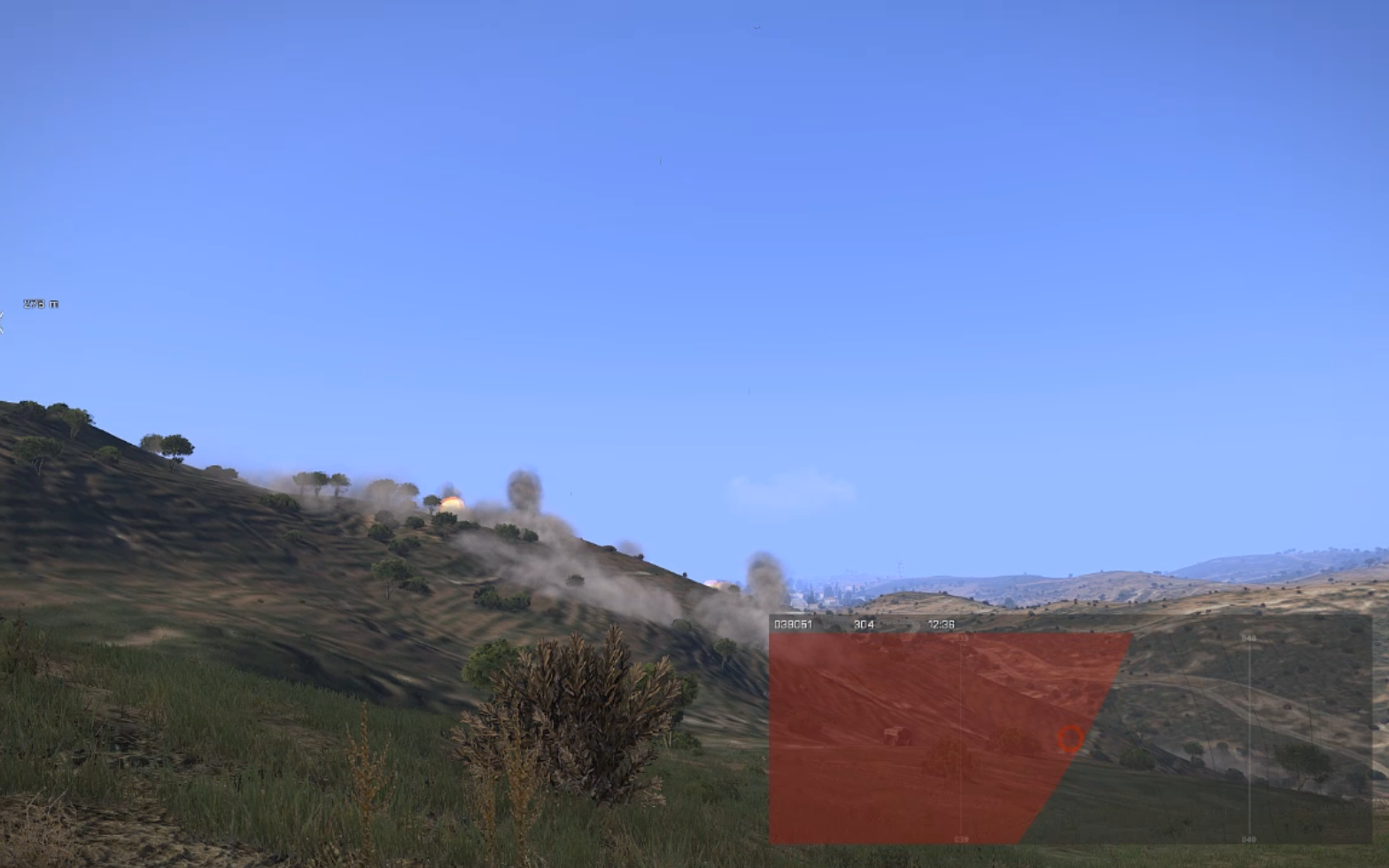
The jet plane will do a low altitude fly-over for the pre-warn (the jet sound is loud), the players would check their map (default 'm' key) to see where the bombing zone(s) will be placed, as they would be marked in an amber marker with a random size/diameter. If any player(s) are in the zone... it would be time to run run run!

The jet plane will then loop around (avoiding all other air traffic), gain altitude and fly back over the determined bombing zone which in-turn, changes the amber marker to red, and it's bombs-away!


Uh ow... bombing zone
 
Once the jet plane has dropped all it's bombs (bomb number depends on diameter of zone), it then flies off into the distance, which removes the red marker from your map... hopefully by this stage, you are still alive! :D

Bombs be dropping
I have gone over my bombing zone script multiple times, redone the procedures, redone the variable checks, redone the cleanup of entities/objects/etc... and can now say that whether I run the script once or twenty times at the same time... everything works perfectly, each jet plane does-their-own-thing and there are absolutely NO left-overs to clutter up memory (memory leaks) or affect FPS.

From being a novice at Arma 3 scripting/coding, and learning as I proceed, I'm fairly proud of what I have achieved in a short amount of time.

The video below shows an in-game demonstration of my bombing zone system in action. In this video, I ran the script/function six times at once... as you will see multiple amber and red zones on the map.


Another part of the mod created, more to follow.

-soul.